
Cottage Software
Case Study
Cottage is a start up founder friendly platform that matches companies with freelancers to complete coding tasks on a secure cloud platform.
Cottage's mission is to make well-paying developer work more easily accessible and flexible.
Problem
Non-technical founders do not complete onboarding due to no onboarding flow built into the Cottage platform. Currently, the CEO/Founder personally gathers information from clients and manually sets up their Cottage account.
Project Duration
3 Weeks
Responsibility
UX Designer & Researcher
Team
Me, 3 UX Designer, 2 Developers (Co-Founders)
Tools
Figma, Canva, Asana,
Google Suite
Methods
Affinity Map
Competitive and Comparative Analysis
Heuristic Evaluation
Task Analysis
User Interviews
User Flows
Personas
Wireframes
Sketches
Usability Testing
Prototype
Cottage Customers
Non-Technical Founders (Demand-Side Clients)
Start up founders and CEOs with limited coding knowledge.
Start up Dev Leads
(Demand-Side Clients)
May lead a small in-house dev team, or act as a one-person product and dev team writing all the code themselves.
Freelance Developers (Supply-Side Experts)
Development professionals who may be full-time freelancers, or looking to make extra money in their spare time.
EMPATHIZE phase was to demonstrate an understanding of our client's business goals as well as the target users and needs. I was able to identify this through task analysis, comparative analysis, heuristic evaluation, user interviews, and affinity mapping.
Heuristic Evaluation
We reviewed the current website to better understand the user experience and identify pain points users might have. The takeaway:
Users were unclear and confused about the onboarding process as an automated version was non-existent. We determined that our primary focus would be to create an automated, straightforward onboarding process for users.
Task Analysis
We interviewed the Cottage co-founders to understand the technical steps to successfully complete the sign-up process. The steps are shown below.
Step 1: Create a Cottage account.
Step 2: Must have source code stored in GitHub.
Step 3: Code is imported from GitHub to Cottage's cloud-based IDE.
Step 4: Customer provides variables and initiation code to Cottage.
Step 5: Customer sets up billing through Stripe payment system.
Comparative Analysis
The goal was to identify how other platforms (GitHub & LogRocket) present backend integrations to users in the setup flow shown below.

Users do not have to leave the Cottage website in order to import/connect information from another platform, making the process more seamless.
User Interview Findings
We interviewed 4 users, of whom 2 were technical founders and 2 were non-technical founders. Then created an affinity map to see the most common trends. The interview takeaways are below.
Cottage's value is in-browser web-hosted IDE, lets freelancer see code, task, and understand how long it will take to complete a task.
100%
I would use Cottage as a freelancer to make extra money on short tasks.
50%
The founder of Cottage have been manually onboarding/set-up clients to start using Cottage.
50%
Obstacle for non-technical founder is not understanding exactly what to specify for freelancing work.
50%
Cottage currently does not have a onboarding feature.
100%
Quality of work and trustworthiness is important concern.
75%
DEFINE phase was primarily focused on synthesizing the research findings to identify insights and patterns for our target users.
Research Synthesis
1. Not enough introductory information on the sign-up process.
2. No automated onboarding feature for clients.
3. No payment set-up for clients.
We realize that our initial challenge wasn't the core issue based on our research findings. Therefore, we reframed the problem:
Reframing the Problem
Users need an introductory guideline to better understand the sign-up process before completing the onboarding feature.
Technical User Persona

Alex T.
Co-Founder/Dev Lead of Porrig.
Needs:
-
To hire a freelance developer, short term, to complete a task so that his team can focus on a bigger, more important task.
-
To feel confident in the quality of work the freelancer will provide.
-
To know that the Cottage website is secure.
Frustrations:
-
Limited staff to build product.
-
Has concerns about the quality of freelance work and security of cloud solutions.
-
Doesn’t want to spend much time searching for freelancers.
Non-technical User Persona

Liam S.
Non-technical co-founder of a start up.
Needs:
-
To hire a freelancer to complete a task so that he/she can focus on business day-to-day.
-
Processes to be quick and efficient.
-
To delegate tasks, to keep him from being overworked and overwhelmed.
-
Transparency and clarity on how hiring a freelancer would work.
Frustrations:
-
Is non technical, does not always understand developer jargon.
-
Hard to scale product with limited staff.
-
Is overwhelmed.
-
May not know how to communicate with developers.
IDEATE phase portrays the application of the solution from the persona and user flows we created. The sketches and wireframes were the first steps before we created the first mid-fidelity prototype.
User Flow
The user flow shows how the persona (target user) would navigate on the desktop website, the goal is to complete the onboarding process.

Mid-fidelity Prototype
In a week's time we went from Lo-Fi sketches to Mid-Fi prototype. Here we focused on three key features- designed around the user's pain points.

New Homepage & Plan Pricing page
In our mid-fidelity desktop wireframes for our primary persona Alex, we focused on introducing the Cottage platform and the pricing plans.
Main Onboarding Flow
In our mid-fidelity desktop wireframes for our primary persona Alex, we focused on the process of account creation, GitHub link, and code import for Alex to get set-up with Cottage.

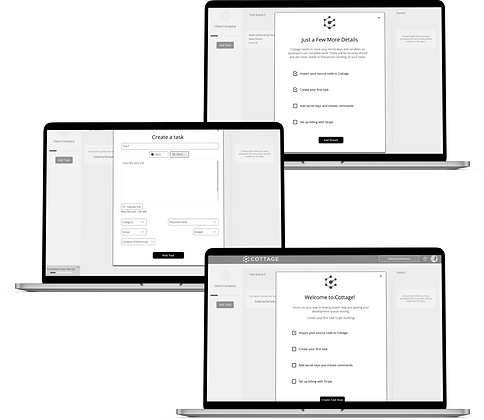
Progressive Onboarding Flow
In our mid-fidelity desktop wireframes for our secondary persona Liam, we focused on creating his first task, and created a reminder for him to complete the remaining onboarding steps.
Usability Testing
After completing our mid-fidelity desktop prototype, we conducted usability testing to discover how users will interact with the flow. From our 3 participants that have some knowledge of how freelancing platform works, these are our 4 key trends from our findings:
2/3 users had questions on the pricing page.
2/3 users wanted a more specific error message.
3/3 users completed all onboarding steps.
3/3 users said the onboarding process was clear.
Iterations
Based on our usability testing, participants wanted more information and clarity on the pricing page. We revised the content in our next iteration:


-
Clear explanation of what is included free in the basic plan.
-
Emphasized flexibility of service options.
-
Emphasized that the cloud IDE is part of all service plans.
-
More scannable side-by-side comparison of pricing plans and features.
-
Action-oriented buttons aligned with Call to Action best practices.
TEST portion was the user testing of the mid-fidelity prototype. Following the feedback for design improvements, we made necessary iterations.
Visual Design
&
Style Guide
Cottage didn't have any branding or style guidelines. For our visual design we took inspiration from both the current Cottage website, as well as competitive and comparative examples, for the overall look and feel of the design. We determined this color palette and font:

Hi-Fidelity Prototype
Final Prototype
The high fidelity Cottage desktop web includes changes made from iterations, re-designing the home page, and creating an overlay showing the steps needed to complete the sign-up process.
Summary
Our client said that we surpassed their expectations by designing an onboarding flow for their clients that keeps them engaged with their application and guides them to their high-value interactions in a fun and simple manner.
Retrospective
It was challenging to grasp what the sign up process would look like in the beginning as it had many variables associated with the full onboarding process. We had to spend a substantial amount of time doing research on the onboarding steps as well as meeting with the Cottage team regularly, we were able to break it down piece by piece and fully understand what each step entails.
After presenting the deliverables to stakeholders, we hand-off the final prototype to the Cottage team and they have integrated the Cottage clients Home Page.